What ongoing software maintenance costs
Real NZD figures on ongoing custom software maintenance — year-1 vs year-5 cost curves, what a retainer covers, and what skipping it really costs you in year three.
The second cheque
The quote you sign for a custom build is the smallest cheque you'll write for that software over its lifetime. Most owners know that. Most still aren't told what the rest of the cheques add up to.
This article is about the second number. What ongoing maintenance actually costs for custom software in NZ, what a package covers (and doesn't), and what skipping maintenance turns into by year three.
The NZD figures below are our 2026 numbers.
The shape of the cost curve
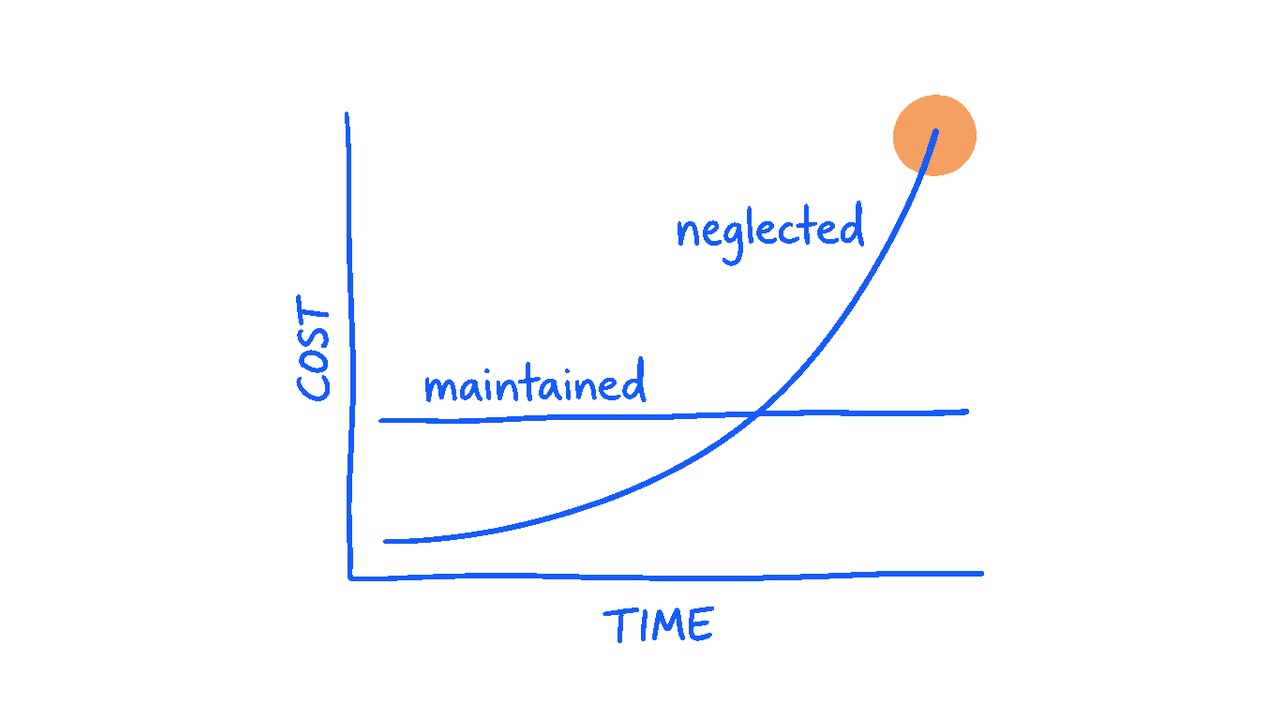
Maintained software follows a flat cost line, month after month, against a fixed monthly package. Neglected software follows a curve that eventually turns into a cliff. Same software either way. Wildly different five-year totals.
Year 1: Bedding-in. Real users find real bugs that User Acceptance Testing (UAT) never quite catches. Small workflow tweaks land in the first month or so after launch. The activity is heavier than later years, but the package absorbs it. You pay the same monthly fee from launch onwards.
Years 2–3: Steady state. The bugs are mostly resolved. Maintenance is now framework upgrades, dependency patches, the occasional small workflow tweak. The fee stays flat. Skipping a framework upgrade in year two is what makes year three painful.
Years 4+: The fork in the road. Software that's been maintained continues to cost the same predictable package fee. Software that hasn't enters legacy territory. Harder to find developers for. Harder to upgrade. Exposed to security risks the rest of the world patched years ago. The annual cost on unmaintained software can double or triple compared to a maintained app, and at some point it tips into the refactor-or-rebuild decision.
What a maintenance package actually covers
Maintenance packages at Urban Lightbulb are optional. We won't force one on you, and a few build types genuinely don't need one (covered below). For everything else, we run maintenance as fixed monthly packages sized to match the build.
There are three tiers:
- Small project: $500/month. For simple builds in the $15k–$30k range. Limited support, latest-build updates, baseline maintenance to keep the software current.
- Medium project: $3,000/month. For the typical medium custom app in the $30k–$75k range. Full coverage of bugs, user issues, framework and dependency upgrades, security patches, performance work, plus ongoing support and regular check-ins.
- Large project or SaaS: $5,000/month. For larger builds and SaaS products. Same coverage at a scale that reflects the larger codebase, more integrations, and a wider user base. Includes priority support and regular check-ins to keep communication open.
Inside each package, a maintenance fee covers:
Framework and dependency upgrades. Laravel and Vue both ship major versions roughly once a year. Skip two and the upgrade becomes a rebuild. We keep these current.
Security advisories. When a vulnerability is disclosed in a library you depend on, someone needs to patch it within days. Inside the package, that someone is us.
Small workflow tweaks. The kind of thing your team raises in a Slack message: "can the report show last month by default?". An hour of work. Inside the package, it's prioritised and done that week. Outside one, the same request needs scheduling and budget approval before we can pick it up.
Performance work. Software gets slower as data grows. Indexes need adding, queries need tuning, caching needs adjusting. Routine.
Backups and monitoring on the application side. The boring infrastructure that keeps the app alive. Server hosting is separate and billed on its own line.
What the package doesn't cover: new features, new modules, integrations that didn't exist on launch. Those are scoped separately as feature development, on top of the maintenance fee. The package keeps the existing build healthy; the feature budget is for building the next version of it.
Feature development as an add-on. New features sit outside the maintenance package and run on their own monthly budget. We scope features by size rather than billing by the hour. A small feature, like a new page or a new filter on a sidebar, is around half a day to a day's work and sits at roughly $900. Medium features run to a few days. Large features take a week or more. Your monthly feature budget determines how many of those land in any given month, and you can dial it up or down as priorities shift.
What skipping maintenance actually costs
The temptation to skip a package is straightforward. The software seems to be working. Why pay $3,000 a month for what feels like nothing happening?
Here's what nothing happening looks like by year three:
Frameworks two versions behind. Each version skipped roughly doubles the upgrade cost when you eventually have to do it. Laravel 10 to 11 might be a few thousand dollars of work. Laravel 10 to 13 (three versions later) might be twenty thousand and a two-month rebuild.
A security advisory you missed. Best case, it's a patch you should have applied. Worst case, customers find the breach before you do. Reputation costs a lot more to repair than the maintenance ever would have.
No one who remembers how it works. Developer turnover happens at every studio. With a package, knowledge stays current, someone touched the code recently. Without one, by year three the developer who built it has moved on and the next person to open the project takes twice as long to fix anything because they're learning the codebase from scratch.
Performance creep. Database tables that were 10,000 rows on launch are 800,000 by year three. Queries that used to take 200ms take six seconds. By the time staff complain, it's been a slow degradation for eighteen months.
The slow friction. Even if no rebuild ever comes, every day without active maintenance is a day your team works around small frictions that would have been raised and fixed at a monthly check-in. The report that takes too long. The button that doesn't quite work. The bug nobody logs. None of it is catastrophic. Collectively, it's the difference between a well-oiled tool and a machine that technically still works.
The big bang upgrade. Eventually the legacy state forces a major project. The lucky version is a modernisation that comes in around 50% of the original build cost — most of the architecture is salvageable, frameworks and key sections get refactored. The unlucky version is a full rebuild at 150% or more of the original, because scope has grown, requirements have shifted, and the old codebase isn't worth saving.

This is why we say software isn't a one-off purchase. The build is the down payment. The maintenance is the partnership that keeps the tool useful day after day. Monthly check-ins. Friction surfaced and fixed. People who still know how it works. Skip it and the software keeps running for a while. Then it doesn't.
When a package is genuinely optional
Every package we offer is optional. A few situations where it actively doesn't make sense:
You have an in-house developer. Real one, with the skills to maintain a Laravel-Vue stack. Then they should own maintenance, and a package would be duplication. The trap is the in-house developer who's actually a generalist, handling everything, doing none of it deeply. That setup usually needs a partner studio behind it.
The app is a short-lived tool. Built for a campaign, a single event, a project that has a defined end. Sometimes the right answer is to build it, run it, and decommission it. No long-term maintenance needed.
The use is genuinely light. Internal tool, three people, no integrations, no compliance exposure. We can build these and hand them over with documentation and an "email us when something breaks" arrangement.
For anything client-facing, anything carrying transactional data, anything that more than a handful of staff rely on day-to-day, a package is the right call. Not because we want the recurring revenue, because we've seen what happens to the businesses that skipped it.
How to budget for the long game
If you're planning a build, budget the maintenance package alongside the build itself. The package is the same fixed fee every month, sized to your project. On a medium build, that's $3,000 per month, or $36,000 over a year.
Build the maintenance line into your operating budget, not your project budget. A project budget gets approved once and forgotten. An operating budget gets reviewed every year, which is exactly the cadence software maintenance needs.
If you also want regular new features, set a feature budget on top. The realistic floor for a subscription is around $1,000 a month, below that the scheduling overhead eats the spend and you're better off paying per feature. From $1,000 upwards, your work gets prioritised slots instead of queuing behind major projects. $5,000 a month is what we'd recommend for steady delivery on a larger app or SaaS product. Bite-sized blocks against that spend, dialled up or down as priorities shift.
Server and hosting costs are separate again, billed on their own line, and not part of either budget above.
If a developer quotes you a build, make sure you understand what the maintenance side of it will look like before you sign. Some studios bundle a plan, some quote it separately, some bill it hourly, some haven't really thought about it yet. Asking upfront tells you which of those you're dealing with. And a few other things you should be asking before you sign round out the picture.
The short version
Custom software you maintain costs a predictable percentage of the build each year, indefinitely. Custom software you don't maintain costs nothing for a few years and then a large, unpredictable number all at once.
If you can afford the build, you can afford the maintenance. Plan for both or plan for neither. The middle ground of building it now and worrying about maintenance later is the most expensive path we see clients take.
If you're not sure what the right ongoing arrangement looks like for your specific build, or you're still working out whether to commission a custom build at all, that's a good conversation to have before money changes hands.